

You’ve set up Routines for your child: study time in the afternoon, bedtime limits in the evening, and everyday protections that apply the rest of the time. But when different rules interact, it can be hard to quickly understand what’s happening right now and what will happen next.
Is the current restriction coming from a Routine? A default rule? Or something managed by the school?
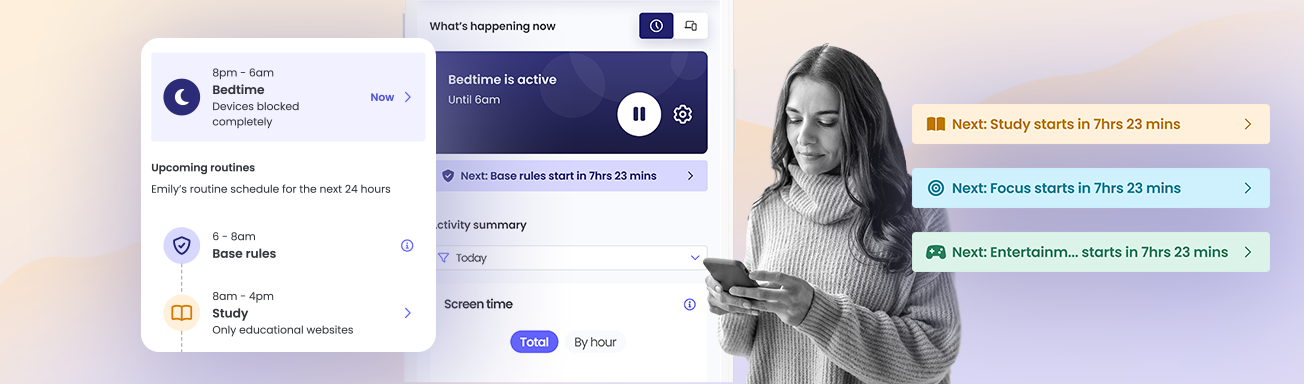
What’s next makes this easier to understand by showing you exactly how your child’s device rules change throughout the day.
See what’s happening now and what comes next
From the Dashboard, you can now easily see both the current rule state and the next upcoming change.
A new “Next” bar highlights the upcoming rule change and shows how much time is left before it starts. The countdown helps make rule changes more predictable, so you always know when routines or restrictions will take effect.

A clearer view of your child’s day
With just a glance, you can see what’s happening on your child’s device right now and what will happen next.
Tapping the “Next” bar opens a detailed daily schedule, which shows how rules are structured throughout the day.
The schedule shows the sequence of:
- Base rules, which apply when no routine is active
- Routines such as Study time or Bedtime
- School-managed rules, when applicable
Qustodio clearly labels each rule state so you can understand how different rule types interact. The app shows base rules as the default protection when no routine is active and marks school rules as restrictions managed externally during school hours.
To see the What’s next, make sure your Parents app is updated to the latest version.
Once updated, you’ll be able to see upcoming rule changes directly from the Dashboard and explore your child’s schedule.

